

One of the most common questions we get is:
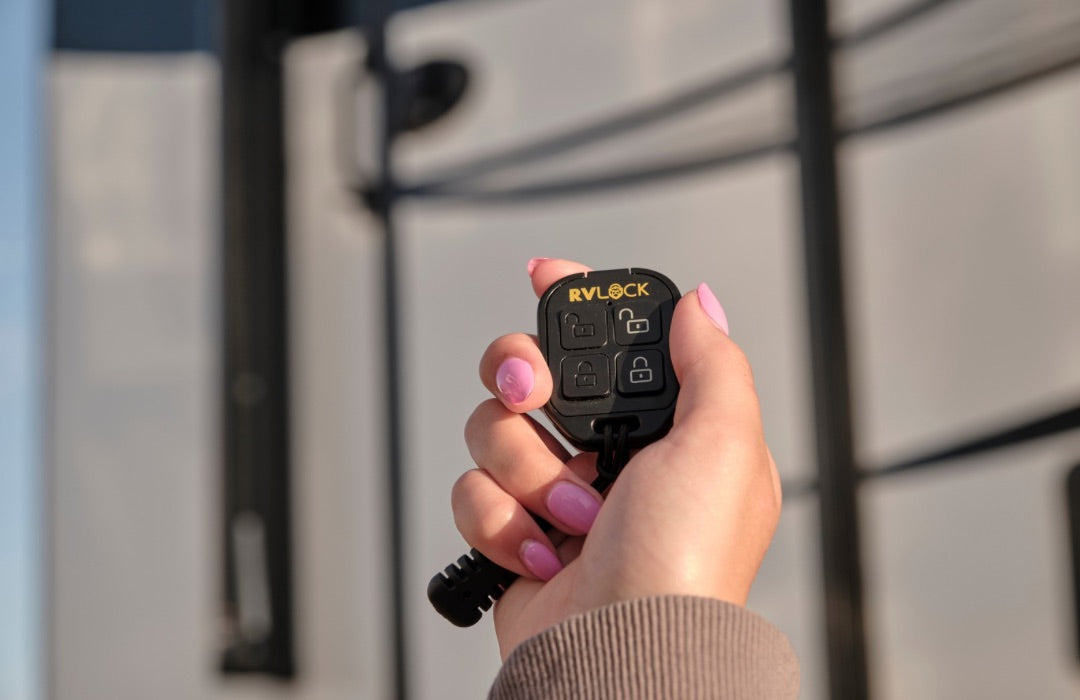
“Why does my RVLock fob remote have two sets of lock and unlock buttons?”
At first glance, it might look like a duplicate feature, but it’s actually designed with flexibility in mind.
Here’s exactly why we built it that way.
The Real Reason: Separate Control for Multiple RVLock Products
The dual lock and unlock buttons were intentionally designed for RVers who have:
- A front and rear entry door
- A main door and a baggage handle
- Multiple RVLock products installed
Each set of lock/unlock buttons can be programmed independently.
That means you can:
- Lock your front door without locking your back door
- Control your baggage compartment separately
- Manage multiple access points without confusion
It gives you control instead of grouping everything together automatically. Although, you do have the option to have everything lock/unlock at the same time.
Example 1: Front and Back Doors
If your RV has both a front and rear entry door:
- Set 1 of lock/unlock buttons → Program to front door
- Set 2 of lock/unlock buttons → Program to back door
Now you can control each entry point separately from one fob.
This is especially helpful for:
- Families
- Larger fifth wheels
- Toy haulers
- RVs with high traffic at different doors
Example 2: Main Door + Baggage Lock
If you have a primary RVLock handle and a separate RVLock baggage handle:
- One set of buttons can control your main entry door
- The second set can control your baggage compartment
No need to carry multiple remotes.
What If I Only Have One RVLock Handle?
If you only have one RVLock handle and no other RVLock products, you still have options.
You can program both sets of lock/unlock buttons to the same door
This means:
No matter which set of buttons you press, your RV will lock or unlock.
Some RVers like this setup because:
- It gives redundancy
- It reduces accidental mis-presses
- It makes the remote feel more intuitive
Why We Designed It This Way
RV life isn’t one-size-fits-all.
Some RVers have:
- One door
- Two doors
- Multiple storage compartments
- Different access needs
Instead of limiting functionality, we built flexibility into the fob from the beginning.
That way, whether you have one RVLock product or several, your remote works for your setup.
Frequently Asked Follow-Up Questions
Do both button sets come pre-programmed?
No, you program your fob remote to your RVLock handle.
Can I reprogram one set later?
Absolutely.
What if I accidentally program both sets to the wrong door?
Simply repeat the programming process and ensure you press the other button set.
Where can I find installation instructions?
You’ll find all installation guides here on our website, no matter which RVLock product you have.
The two sets of lock and unlock buttons on your RVLock fob aren’t duplicates, they’re built for flexibility. Whether you’re controlling two entry doors, managing a baggage handle, or just want backup button access for one door, the dual-button design gives you options.
If you’re unsure how to program your fob or want help setting up multiple locks, watch our installation videos or our support team is here to help.
See you on the road!
Share:
What to Do If You Lose Your RV Keys (And How to Avoid It)
Meet the Faces Behind the Journey: RVLock’s Creator on the Road